定义: 一有序的字符序列集合,常量。
- 用单引号引起来
- 用双引号引起来
- 用三重(单双均可)引号引起来
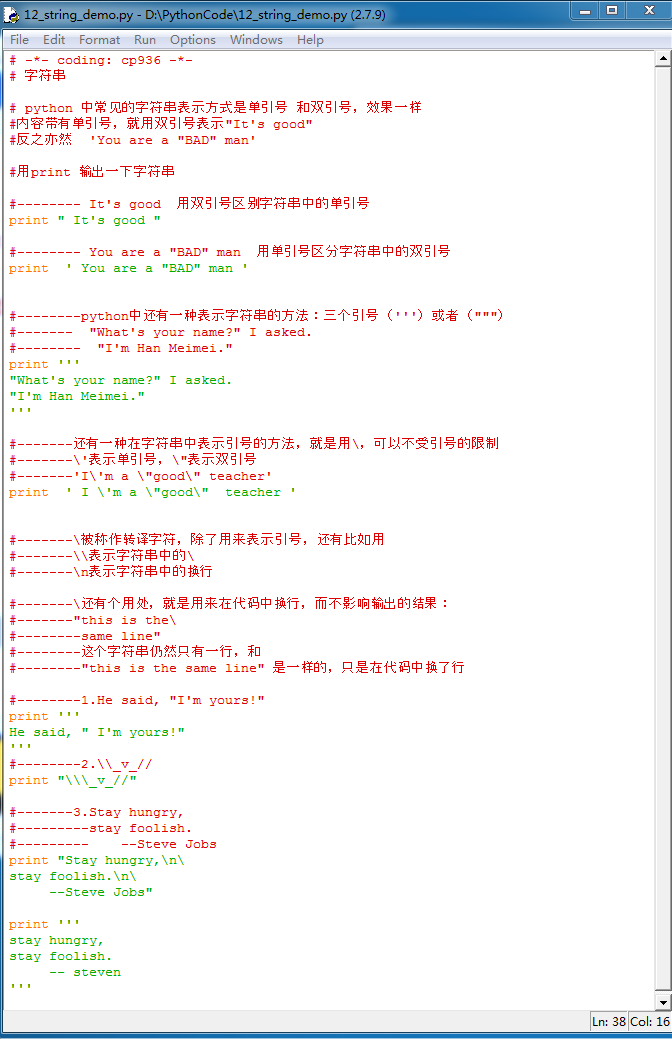
# -*- coding: cp936 -*-
# 字符串
# python 中常见的字符串表示方式是单引号 和双引号,效果一样
#内容带有单引号,就用双引号表示"It's good"
#反之亦然 'You are a "BAD" man'
#用print 输出一下字符串
#-------- It's good 用双引号区别字符串中的单引号
print " It's good "
#-------- You are a "BAD" man 用单引号区分字符串中的双引号
print ' You are a "BAD" man '
#--------python中还有一种表示字符串的方法:三个引号(''')或者(""")
#------- "What's your name?" I asked.
#-------- "I'm Han Meimei."
print '''
"What's your name?" I asked.
"I'm Han Meimei."
'''
#-------还有一种在字符串中表示引号的方法,就是用,可以不受引号的限制
#-------'表示单引号,"表示双引号
#-------'I'm a "good" teacher'
print ' I 'm a "good" teacher '
#-------被称作转译字符,除了用来表示引号,还有比如用
#-------表示字符串中的
#-------n表示字符串中的换行
#-------还有个用处,就是用来在代码中换行,而不影响输出的结果:
#-------"this is the
#--------same line"
#--------这个字符串仍然只有一行,和
#--------"this is the same line" 是一样的,只是在代码中换了行
#--------1.He said, "I'm yours!"
print '''
He said, " I'm yours!"
'''
#--------2._v_//
print "_v_//"
#-------3.Stay hungry,
#---------stay foolish.
#--------- --Steve Jobs
print "Stay hungry,n
stay foolish.n
--Steve Jobs"
print '''
stay hungry,
stay foolish.
-- steven'
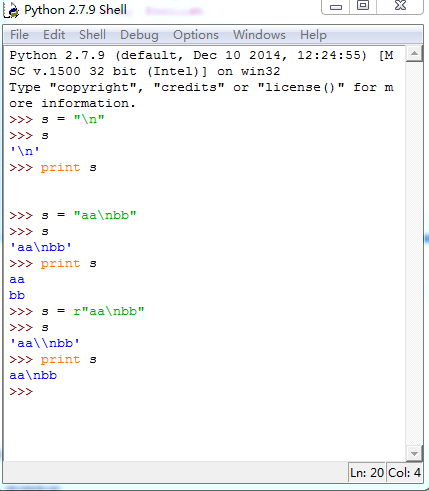
- 转义字符串
- raw字符串
- 关闭转义机制 s = r"aanbb".里面的n不做转义字符处理
- Unicode字符串
- s = u"aanbb" (??)
- 格式化字符串
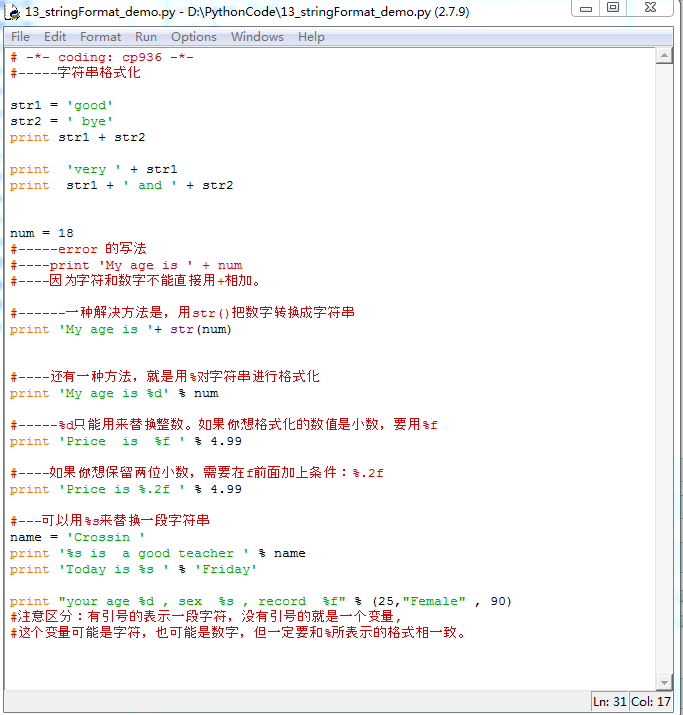
字符串格式化:
print "your age %d , sex %s , record %f" % (25,"Female" , 90)
每个%X 对应后面的一个值。
# -*- coding: cp936 -*-
#-----字符串格式化
str1 = 'good'
str2 = ' bye'
print str1 + str2
print 'very ' + str1
print str1 + ' and ' + str2
num = 18
#-----error 的写法
#----print 'My age is ' + num
#----因为字符和数字不能直接用+相加。
#------一种解决方法是,用str()把数字转换成字符串
print 'My age is '+ str(num)
#----还有一种方法,就是用%对字符串进行格式化
print 'My age is %d' % num
#-----%d只能用来替换整数。如果你想格式化的数值是小数,要用%f
print 'Price is %f ' % 4.99
#----如果你想保留两位小数,需要在f前面加上条件:%.2f
print 'Price is %.2f ' % 4.99
#---可以用%s来替换一段字符串
name = 'Crossin '
print '%s is a good teacher ' % name
print 'Today is %s ' % 'Friday'
print "your age %d , sex %s , record %f" % (25,"Female" , 90)
#注意区分:有引号的表示一段字符,没有引号的就是一个变量,
#这个变量可能是字符,也可能是数字,但一定要和%所表示的格式相一致。
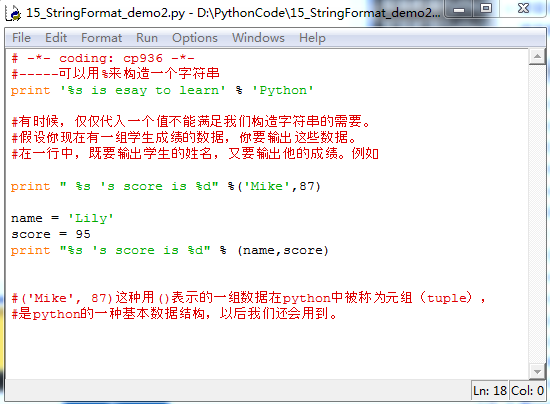
# -*- coding: cp936 -*-
#-----可以用%来构造一个字符串
print '%s is esay to learn' % 'Python'
#有时候,仅仅代入一个值不能满足我们构造字符串的需要。
#假设你现在有一组学生成绩的数据,你要输出这些数据。
#在一行中,既要输出学生的姓名,又要输出他的成绩。例如
print " %s 's score is %d" %('Mike',87)
name = 'Lily'
score = 95
print "%s 's score is %d" % (name,score)
#('Mike', 87)这种用()表示的一组数据在python中被称为元组(tuple),
#是python的一种基本数据结构,以后我们还会用到。
字符串的应用例子:打开文件路径需要注意一些或许会出现转义字符
open('c:temptex.t','a+')#raw字符串,关闭转义机制  t 转义后是tab open(r'c:temptex.t','a+')

open('c:temptex.t','a+')
字符串基础操作
- + 连接
- * 重复
- s[i] 索引 index
- s[i:j:step] 切片 slice
- (step)可选的,切的时候是顺序往后还是往前+1,这个打印出来还会有方向问题
- for 循环遍历
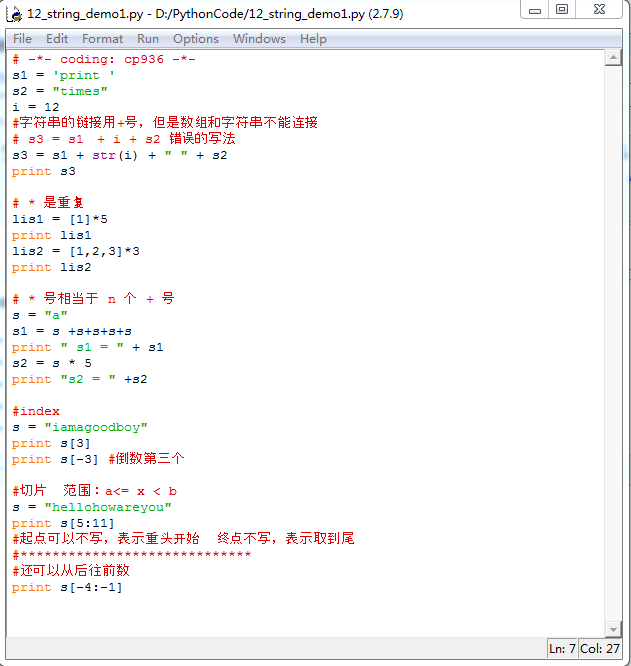
# -*- coding: cp936 -*-
s1 = 'print '
s2 = "times"
i = 12
#字符串的链接用+号,但是数组和字符串不能连接
# s3 = s1 + i + s2 错误的写法
s3 = s1 + str(i) + " " + s2
print s3
# * 是重复
lis1 = [1]*5
print lis1
lis2 = [1,2,3]*3
print lis2
# * 号相当于 n 个 + 号
s = "a"
s1 = s +s+s+s+s
print " s1 = " + s1
s2 = s * 5
print "s2 = " +s2
#index
s = "iamagoodboy"
print s[3]
#切片 范围:a<= x < b
s = "hellohoware you"
print s[5:11]
#起点可以不写,表示重头开始
#终点不写,表示取到尾
关于
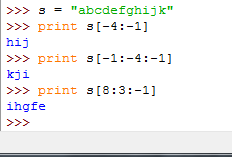
- (step)可选的,切的时候是顺序往后还是往前+1,这个打印出来还会有方向问题
# -*- coding: cp936 -*-
#------------------字符串的索引和切片----------
#字符串的一些与list相似的操作。
#字符串的操作
#------------------1. 遍历-----------------
word = 'helloworld'
for c in word:
print c,
#----------------2. 索引访问-------------
print word[0]
print word[-2]
# -1 表示倒数第一个,-2 表示倒数第二个
#与list不同的是,字符串不能通过索引访问去更改其中的字符。
#--error*******word[1] = 'a'
#----------------3. 切片----------------
#通过两个参数,截取一段子串,具体规则和list相同。
print word[5:7]
print word[:-5]
print word[:]
#wo
#hello
#helloworld
#------------------------4. 连接字符--------------
neword = ','.join(word)
print neword
#h,e,l,l,o,w,o,r,l,d
【说明】:本文章由站长整理发布,文章内容不代表本站观点,如文中有侵权行为,请与本站客服联系(QQ:254677821)!