a.工具简介
最近忙着改论文,但迫于手机没有流量,反复共享电脑wifi的操作已经让我忍无可忍,而“猎豹wifi”“360wifi分享”等工具曾导致电脑多次睡死(可能是台式机的usb网卡兼容性问题)。因此抽空写了个便利工具,完全利用windows自带功能实现,主要合并了“命令提示符”的若干指令:
以及部分.net对系统进行管理:
经测试,本工具不影响闪讯心跳验证,上网稳定,不会像手动共享那样在几分钟后就会断网。
当然,如果不是浙江一带的校园网用户可能不需要闪讯这类进行拨号,直接开启热点进行分享即可。
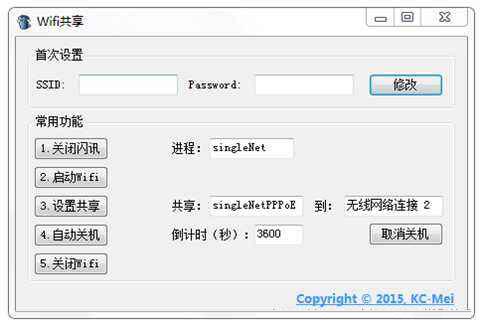
github源程序(项目文件): https://github.com/blz-galaxy/tools-wifi-sharing
b.指令与执行
相关命令提示符(也可以用bat脚本方式调用)
- 设置系统自带的虚拟网卡microsoft virtual wifi miniport adapter,从而创建热点(只需在首次使用前配置):
netsh wlan set hostednetwork mode=allow ssid=blz_galaxy key=1234567890
此处热点标识为blz_galaxy,密码为1234567890,请自行修改。
- 开启分享的wifi热点:
netsh wlan start hostednetwork
- 关闭wifi热点:
netsh wlan stop hostednetwork
- 定时关机(3600秒后关机):
shutdown -s -t 3600
- 设定关机后也可以取消关机计划:
shutdown -a
- c#调用控制台指令方式:
system.diagnostics.process _pcmd;

_pcmd = new system.diagnostics.process();
_pcmd.startinfo.filename = "cmd.exe";
_pcmd.startinfo.useshellexecute = false;
_pcmd.startinfo.redirectstandardoutput = true;
_pcmd.startinfo.redirectstandardinput = true;
_pcmd.startinfo.createnowindow = true;
_pcmd.start();//执行目标指令 _pcmd.standardinput.writeline("shutdown -a");
再一例:
-
regex reg = new regex(@"[u4e00-u9fa5]");//正则表达式if (reg.ismatch(textbox1.text) || reg.ismatch(textbox2.text))
{
    messagebox.show("不能含有汉字");
    return;
}if (textbox2.text.length < 8)
{
    messagebox.show("密码8位以上");
    return;
}

_strwrite = string.format("netsh wlan set hostednetwork mode=allow ssid={0} key={1}", this.textbox1.text, this.textbox2.text);
_pcmd.standardinput.writeline(_strwrite);
- 自动关闭指定进程(如闪讯的“singlenet”进程)
取代了人工在任务管理器中查找进程,解救密集恐惧症患者~
-
process[] processes = process.getprocessesbyname(processname);foreach (process instance in processes)
{
    try     {
        if (instance.processname == processname)
            instance.kill();;
    }
    catch { }
具体可以参看: 【c#】指定进程关闭&闪讯下的wifi共享
- 调用windowssystem32hnetcfg.dll,即能使用“netconlib”实现自动共享 (关键)
try {
    string connectiontoshare = this.textbox3.text; // 被共享的网络连接string sharedforconnection = this.textbox4.text; // 需要共享的网络连接     netsharingmanager manager = new netsharingmanager();
    var connections = manager.enumeveryconnection;

    foreach (inetconnection c in connections)
    {
        var props = manager.netconnectionprops[c];
        var sharingcfg = manager.inetsharingconfigurationforinetconnection[c];
        if (props.name == connectiontoshare)
        {
            sharingcfg.enablesharing(tagsharingconnectiontype.icssharingtype_public);
        }
        elseif (props.name == sharedforconnection)
        {
            sharingcfg.enablesharing(tagsharingconnectiontype.icssharingtype_private);
        }
    }
}catch {
    messagebox.show("请打开网络和共享中心·查看是不是已经连接internet!", "提示", messageboxbuttons.ok, messageboxicon.information);
}
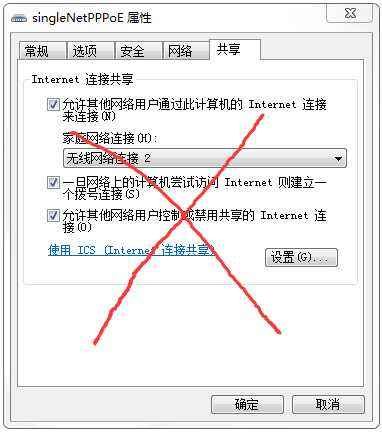
取代手动进入“网络共享中心->更改适配器设置->singlenetpppoe属性->共享->勾选允许分享internet->选择分享目标”这一连串操作,懒人福音~
【说明】:本文章由站长整理发布,文章内容不代表本站观点,如文中有侵权行为,请与本站客服联系(QQ:254677821)!