曾经简单记录过一次:https://www.cnblogs.com/xwgli/p/12341961.html
这次详细记录一下。
1、下载并安装 rewrite 模块,支持 IIS 7 及以上版本
https://www.iis.net/downloads/microsoft/url-rewrite
2、在站点的 web.config 文件中增加 rewrite 规则配置
            <?
            xml version="1.0" encoding="UTF-8"
            ?>
            <
            configuration
            >
            <
            system.webServer
            >
            <
            rewrite
            >
            <
            rules
            >
            <
            rule
            name
            ="强制跳转 https 路径"
             stopProcessing
            ="true"
            >
            <
            match
            url
            ="(.*)"
            />
            <
            conditions
            >
            <
            add
            input
            ="{HTTPS}"
             pattern
            ="off"
            />
            </
            conditions
            >
            <
            action
            type
            ="Redirect"
             url
            ="https://{HTTP_HOST}/{R:1}"
            />
            </
            rule
            >
            </
            rules
            >
            </
            rewrite
            >
            </
            system.webServer
            >
            </
            configuration
            >
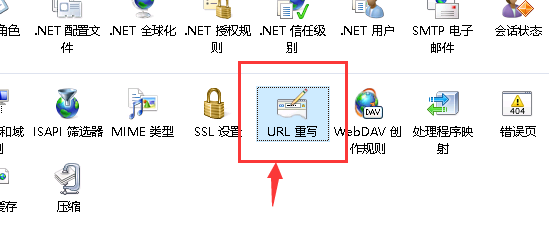
3、或者也可以手动在 IIS 中的图形界面进行配置,具体可以将上述配置放入 web.config 中后,转至 IIS 相应站点的“URL 重写”模块中查看
4、好像配置完成就生效了,可以去浏览器中试试效果了~
参考:https://cloud.tencent.com/developer/article/1590146
https://www.cnblogs.com/wer-ltm/p/10190535.html
原文:https://www.cnblogs.com/xwgli/p/14752403.html
【说明】:本文章由站长整理发布,文章内容不代表本站观点,如文中有侵权行为,请与本站客服联系(QQ:254677821)!